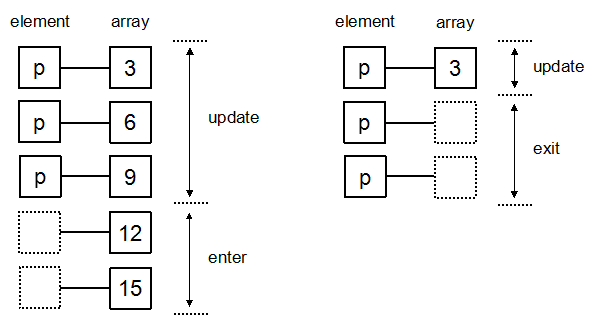
d3 是基于数据绑定的思想,选择器选择元素并与数据绑定到一起,根据数据的内容给元素添加不同的属性,就可以实现各种可视化效果。但由于元素的数量和数据未必一致,因此在绑定的时候 d3 会根据数量的差异执行不同的处理:
- 元素与数据一一对应:执行 update 部分,表示已经存在的元素,用于更新
- 元素少于数据:执行 enter 部分,表示即将进入的元素,用于添加
- 元素多于数据:执行 exit 部分,表示即将退出的元素,用于删除
data()
在执行不同的方法之前,需要先将数据绑定到选择的 DOM 元素上,这样就可以针对这些数据进行相关操作,比如设置属性等。
1
| d3.select("svg").selectAll("circle").data([1, 2, 3]);
|
data 方法的作用是给对应的 DOM 元素添加一个__data__属性,可以通过document.getElementsByTagName("p")[0].__data__看到
update()
给定的数组中的个数和 DOM 元素的数量相等则进行 update 操作
1
2
3
4
5
6
7
8
9
10
11
12
13
14
15
| <svg>
<circle>1</circle>
<circle>2</circle>
<circle>3</circle>
</svg>
<script>
d3.select("svg")
.selectAll("circle")
.data([1, 2, 3])
.attr("cx", 10)
.attr("cy", (d) => d * 10)
.attr("r", 5)
.attr("stroke", "green")
.attr("fill", "none");
</script>
|
给定的 svg 中有 3 个 circle 元素,正好和 data 数据的数量相等,因此这三个元素都会被赋予cx、cy、r值,并被描边画成绿色
enter()
当 DOM 元素少于 data 的数量时,甚至一个元素都不存在的时候,通过 enter 方法就可以让程序帮忙创建。在执行 enter 方法之后,需要通过 append 方法指定多余的数据需要创建什么元素。
1
2
3
4
5
6
7
8
9
10
11
12
13
14
15
16
17
18
19
20
21
| <svg>
<circle>1</circle>
<circle>2</circle>
</svg>
<script>
d3.select("svg")
.selectAll("circle")
.data([1, 2, 3])
.attr("cx", 10)
.attr("cy", (d) => d * 10)
.attr("r", 5)
.attr("stroke", "green")
.attr("fill", "none")
.enter()
.append("circle")
.attr("cx", 10)
.attr("cy", (d) => d * 10)
.attr("r", 5)
.attr("stroke", "red")
.attr("fill", "none");
</script>
|
给定 2 个元素,但是 data 有 3 个数据,因此会同时执行 update 和 enter 操作,最终的结果就是 2 个绿色的圆圈和 1 个红色圆圈。
这时候,如果将 enter 之前的操作部分去掉,那么 update 时则不会执行任何操作,页面上将只有一个红色的圆圈:
1
2
3
4
5
6
7
8
9
10
11
12
13
14
15
16
| <svg>
<circle>1</circle>
<circle>2</circle>
</svg>
<script>
d3.select("svg")
.selectAll("circle")
.data([1, 2, 3])
.enter()
.append("circle")
.attr("cx", 10)
.attr("cy", (d) => d * 10)
.attr("r", 5)
.attr("stroke", "red")
.attr("fill", "none");
</script>
|
为了区分 update 和 enter 的操作,建议将这两个部分分开编写
1
2
3
4
5
6
7
8
9
10
11
12
13
14
15
16
17
18
19
20
21
22
23
24
| <svg>
<circle>1</circle>
<circle>2</circle>
</svg>
<script>
const update = d3
.select("svg")
.selectAll("circle")
.data([1, 2, 3])
.attr("cx", 10)
.attr("cy", (d) => d * 10)
.attr("r", 5)
.attr("stroke", "green")
.attr("fill", "none");
update
.enter()
.append("circle")
.attr("cx", 10)
.attr("cy", (d) => d * 10)
.attr("r", 5)
.attr("stroke", "red")
.attr("fill", "none");
</script>
|
exit()
exit 的作用是在给定的数组元素个数中小于 DOM 个数时,多出来的元素所执行的操作。和 enter 方法不同的是,因为当前元素已经创建了,因此不需要额外的 append 方法来指定创建的元素:
1
2
3
4
5
6
7
8
9
10
11
12
13
14
15
16
17
18
19
20
21
22
23
24
25
26
27
28
29
30
31
32
33
34
| <svg>
<circle>1</circle>
<circle>2</circle>
<circle>3</circle>
<circle>4</circle>
</svg>
<script>
const update = d3
.select("svg")
.selectAll("circle")
.data([1, 2, 3])
.attr("cx", 10)
.attr("cy", (d) => d * 10)
.attr("r", 5)
.attr("stroke", "green")
.attr("fill", "none");
update
.enter()
.append("circle")
.attr("cx", 10)
.attr("cy", (d) => d * 10)
.attr("r", 5)
.attr("stroke", "red")
.attr("fill", "none");
update
.exit()
.attr("cx", 10)
.attr("cy", (d, index) => 4 * 10)
.attr("r", 5)
.attr("stroke", "blue")
.attr("fill", "none");
</script>
|
svg 中的 circle 有 4 个,但是 data 数据只有 3 个,因此不会执行 enter 之后的方法,会执行 exit 之后的操作,需要注意的是,由于多余的元素没有对应的数据绑定,这时候使用 attr 方法赋予属性时第二个参数如果是一个函数,那么函数的默认参数将是 undefined
join()
在 v5 之后的 d3.js 版本,data 绑定数据之后增加 join 方法来同时执行多个操作,效果类似于原来的 merge 方法,但是 merge 方法已经在新版的 d3.js 中不再支持。比如上面 exit 中的代码,可以这样写:
1
2
3
4
5
6
7
8
9
10
11
12
13
14
15
16
17
18
19
20
21
22
23
24
25
26
27
28
29
30
31
32
33
34
35
36
37
38
| <svg>
<circle>1</circle>
<circle>2</circle>
<circle>3</circle>
<circle>4</circle>
</svg>
<script>
const update = d3
.select("svg")
.selectAll("circle")
.data([1, 2, 3])
.join(
(enter) =>
enter
.append("circle")
.attr("cx", 10)
.attr("cy", (d) => d * 10)
.attr("r", 5)
.attr("stroke", "red")
.attr("fill", "none"),
(update) =>
update
.attr("cx", 10)
.attr("cy", (d) => d * 10)
.attr("r", 5)
.attr("stroke", "green")
.attr("fill", "none"),
(exit) =>
exit
.attr("cx", 10)
.attr("cy", (d, index) => 4 * 10)
.attr("r", 5)
.attr("stroke", "blue")
.attr("fill", "none")
);
</script>
|
join 函数可以接受三个函数作为参数,第一个函数为 enter 函数,第二个为 update,第三个为 exit 函数。同时 join 接受一个字符串作为参数,表示后面元素数量不够时增加的元素,后续继续进行赋值操作,这样最终的结果是页面元素数量和 data 数量相同,如果元素数量不足,则补充相同数量的元素,如果元素数量多了,则删除多余的元素,实现remove()方法的效果。
1
2
3
4
5
6
7
8
9
10
11
12
13
14
15
16
17
18
| <svg>
<circle>1</circle>
<circle>2</circle>
<circle>3</circle>
<circle>4</circle>
</svg>
<script>
const update = d3
.select("svg")
.selectAll("circle")
.data([1, 2, 3])
.join("circle")
.attr("cx", 10)
.attr("cy", (d) => d * 10)
.attr("r", 5)
.attr("stroke", "green")
.attr("fill", "none");
</script>
|